

"License Reseller" and "Consulting & Implementation" Partner

Have you ever asked yourself how top companies manage their IT services without any issues, particularly when they need to handle incidents, make changes, or fulfill service requests? If the answer is yes, then you’ve come to the right place. In this piece of writing, we will look at ServiceNow ITSM from the perspective of the DevTools team, explaining in simple terms what it is, how it operates, and how we’ve been able to assist various teams in going beyond their current IT operations. We are ready. Let’s start!
ServiceNow ITSM (IT Service Management) is a cloud-based platform that enables organizations to manage their IT services throughout the entire lifecycle efficiently. Essentially, it is an integration of IT Infrastructure Library-aligned processes and automation capabilities that revolutionize the way teams deal with incidents, changes, requests, and beyond.
Why it matters:
ServiceNow ITSM operates by capturing, managing, and automating IT service processes through structured workflows supported by a central data foundation, the Configuration Management Database (CMDB). Together, these components ensure every request, incident, change, and task is handled consistently and efficiently.
Key elements include:
Ticket or record creation: Requests and incidents enter the system through multiple channels such as the service portal, email, chat, or third-party integrations.
Workflow routing and automation: Rules, SLAs, approvals, and assignment logic direct each ticket to the right team, ensuring faster resolution and fewer manual handoffs.
Comprehensive data tracking: The CMDB stores configuration items and their relationships, enabling accurate impact analysis and informed decision-making across IT operations.
AI and analytics layers: Built-in AI enhances classification, prioritisation, and triage, while analytics provide real-time insights to optimise performance and predict potential issues.
Pro Insight: We once implemented AI-driven ticket categorisation for a mid-size retail client. This reduced manual assignments by 40 % and significantly improved first-contact resolution.
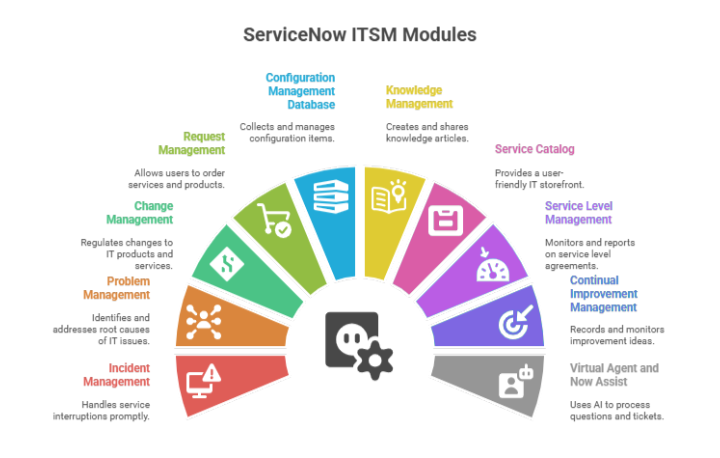
Let’s break down the core modules that make ServiceNow ITSM so powerful:
Incident management handles interruptions promptly by restoring the service operation to normal. Example: Our team has introduced automated escalations to ensure high-severity tickets receive the right attention, thereby reducing critical incident resolution time by 30%.
Problem Management focuses on identifying and addressing the root causes of issues within your IT environment. We typically combine it with Incident data, for example, by merging recurring ticket patterns into a “Known Error” record.
Change Management regulates all changes to IT products and services through formal approval flows and risk assessments. Our customers commend the change calendar and the peer-review system that we have implemented to reduce change failure.
Also Read: What Is Change Management Process?
Allows the users to place orders for services and products through a branded website. We have created catalogs for devices, software installations, and employee onboarding packages, thereby making the end-user experience smoother.
Collects all the configuration items (CIs) and their relationships in one place. Usually, we connect CMDB with monitoring tools, so a CI status gets an auto-update, and allowing a correct impact prediction.
Let’s team write and post articles in order to minimize the number of tickets. One of our client portals now features more than 150 searchable articles, which have been used to redirect 20 percent of tickets.
An IT storefront. We create user-friendly catalog UIs and approved workflows to expedite requests and maximize satisfaction ratings.
Specifies, monitors, and reports upon Service Level Agreements (SLAs). We especially have SLA dashboards with reminders in our projects, which are better seen and followed.
Records ideas of improvements and monitors progress. We prefer to associate this with a quarterly retrospective, which is an effective method of bringing up and practicing feedback.
Utilizes chatbots and AI to process questions and tickets. We have recently assisted in the introduction of a Virtual Agent that could solve 60% of basic access requests without any human involvement.
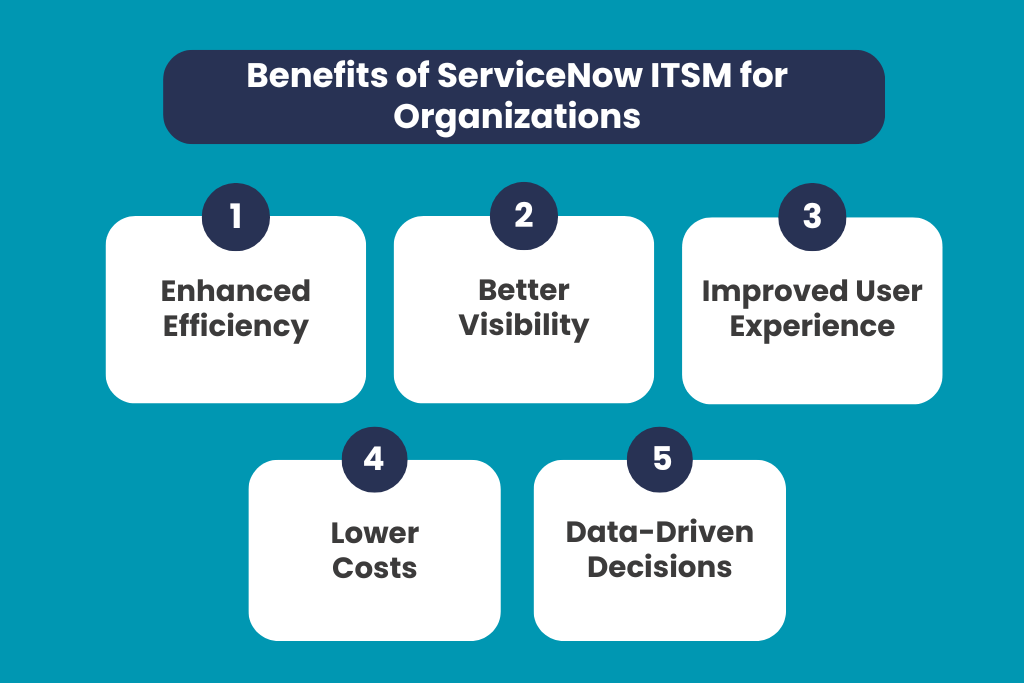
ServiceNow ITSM (IT Service Management) helps organizations streamline their IT operations by integrating tools, automating workflows, and improving service delivery. With its modern, cloud-based approach, businesses can shift from reactive support to proactive service management, leading to measurable gains across efficiency, cost, and customer satisfaction.
Traditional ticketing systems—such as Excel sheets, email chains, or outdated legacy tools—often operate in silos, rely heavily on manual processes, and lack standardization. This leads to inefficiencies, delayed responses, and limited visibility across IT operations. ServiceNow transforms this experience by offering a unified, intelligent platform designed for modern IT service management.
Key advantages ServiceNow brings over traditional systems:
We’ve guided several clients through this selection process:
| Feature | ServiceNow | BMC Remedy | Jira Service Management |
| Layout & Navigation | Modern, highly customizable | Traditional UI | Developer-friendly, simpler layout |
| Extensibility | Powerful low-code platform | Flexible, but complex | Good for dev teams, less for IT Ops |
| AI/Chatbot capabilities | Leading AI stack (Now Assist) | Limited OEM bots | Basic add-ons |
| Enterprise integrations | Broad ecosystem & partnerships | Extensive, but complex | Focused on Atlassian tools |
ServiceNow ITSM is built to align with leading IT service frameworks, helping organizations follow best practices and stay compliant.
● ITIL 4: Core principles, aligned with ServiceNow’s best practices
● ISO/IEC 20000: Service management standard that ServiceNow can help meet
● COBIT, COBIT 2019: For IT governance
● Lean, Agile: Often adopted alongside modules like Continual Improvement
Successful ServiceNow ITSM implementation requires a structured, phased approach that aligns technology with business goals. Based on our experience at DevTools, the following playbook helps organisations achieve a smooth rollout and long-term adoption.
Evaluate existing workflows, tools, pain points, and stakeholder expectations to establish a clear baseline.
Identify quick wins and longer-term goals, ensuring a realistic, value-driven implementation roadmap.
Begin with core ITSM modules and build a proof of concept to validate the approach before expanding.
Set up process workflows, connect CMDB with monitoring or infrastructure tools, and enable required system integrations.
Educate teams on portals, service catalogues, chatbots, and workflows to drive adoption and reduce resistance to change.
Run a pilot with a small group of users, gather feedback, and adjust configurations or workflows as needed.
Roll out additional modules and capabilities once the foundation is stabilised.
Continuously track SLAs, usage patterns, and user satisfaction to refine processes and improve service performance over time.

ServiceNow is doubling down on:
● Now Assist AI: auto-classification, smart triage, resolution suggestions
● Virtual Agent enhancements: multilingual bots, context-aware dialogs
● Predictive AIOps: anomaly detection and proactive alerts
● Process Mining: to discover inefficiencies and optimize workflows
We often pilot ML features in our DevTools engagements, helping clients move from reactive to predictive IT.
Want to level up your ITSM game? We at DevTools specialize in:
● Strategy & assessments: Align ITSM with business goals
● Implementation & integrations: From CMDB to AI
● Ongoing optimization: Governance, reporting, CI, and best practices
● Training & adoption: Enabling your teams for success
Contact us today to see how ServiceNow ITSM can transform your IT operations.
In summary, ServiceNow ITSM provides a unified, automated, and intelligent platform for managing IT services throughout their lifecycle. From incident resolution to continual improvement—and increasingly, AI-assisted operations, it delivers measurable improvements in efficiency, visibility, and user satisfaction. With DevTools’ consulting expertise and real-world experience, your organization can harness its full potential.
ITSM in ServiceNow refers to ServiceNow’s IT Service Management solution, a cloud-based platform that helps organisations manage and deliver IT services efficiently across their entire lifecycle. It standardises core IT processes such as incident, problem, change, request, and knowledge management, all supported by automation and a central Configuration Management Database (CMDB).
Yes, although historically geared toward mid-to-large enterprises, ServiceNow now offers scaled-down licensing and modular deployment options. Many smaller orgs benefit from foundational modules like Incident, Request, and Knowledge.
ServiceNow ITSM follows a custom, quote-based pricing model. The pricing depends on your organization’s size, use cases, and the specific modules or features required. Businesses typically go through a value assessment before receiving tailored pricing.
Natively integrates with monitoring (e.g., Nagios, SolarWinds), HR systems (e.g., Workday), DevOps stacks (Jenkins, GitHub), and communication tools (Teams, Slack), plus hundreds of partner-built connectors.
Timeline depends on the scope:
We recommend phased adoption to deliver early value and minimize risk.

Pramodh Kumar M is a Solutions Architect at DevTools with over 6 years of specialized experience in DevSecOps and enterprise IT solutions. He holds multiple advanced certifications, including Certified Kubernetes Security Specialist (CKS), GitHub Advanced Security, and Azure Solutions Architect Expert. Pramodh specializes in Agile, Cloud & DevOps toolchain implementations, with extensive hands-on experience helping enterprises with digital transformation initiatives. His expertise extends to ServiceNow implementation and support. He is passionate about sharing practical insights on Cloud, DevOps, Automation, and modern IT operations.